

12 crisis management tools for faster, clearer response
Tools for detection, coordination, emergency notification, stakeholder outreach, public updates and post-crisis review.
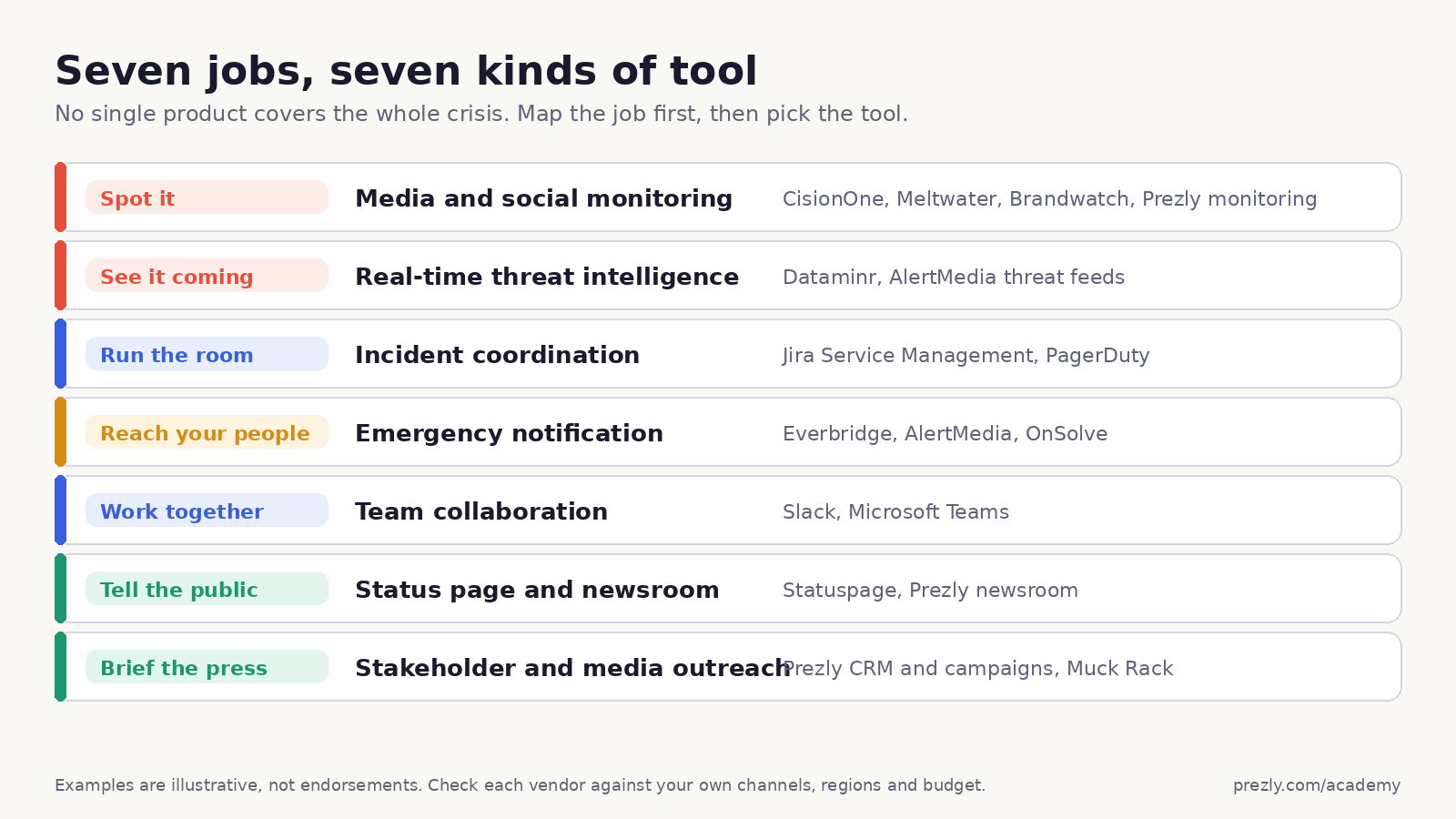
Crisis management tools help teams spot a problem, verify what is happening, coordinate decisions and keep the right people informed.
No single platform does all of that well. Media monitoring won't notify every employee near an affected site. A mass-notification system won't manage journalist relationships. Slack won't detect a reputation problem, however enthusiastically somebody creates `#war-room-final-v3`.
The right setup combines tools around a rehearsed process:
Detect → Verify → Decide → Respond → Update → Review
This guide explains the tool categories, compares twelve current options and shows how to build a practical stack without buying an enterprise control room for a three-person communications team.
- Use media monitoring or social listening to detect fast-moving narratives.
- Use threat intelligence when physical events, locations and employee safety matter.
- Use an incident workspace to assign ownership and preserve decisions.
- Use mass notification to send urgent, targeted messages and track acknowledgements.
- Use a newsroom or status page as the authoritative place for ongoing updates.
- Use a stakeholder CRM and outreach tool to reach journalists, partners and other defined groups.
- Test the entire chain before a crisis. A tool you first configure during the incident is mostly an expensive login screen.
Prezly covers monitoring, stakeholder contacts, email outreach and newsroom publishing for PR teams. It does not replace emergency SMS, employee-safety, on-call or enterprise incident-management systems.
Crisis management tools are software systems that support one or more stages of preparing for, responding to and learning from a serious incident.
Depending on the crisis, that may include:
- detecting media, social, security or operational signals
- verifying facts and assessing severity
- activating a crisis team and assigning responsibilities
- notifying employees, customers, journalists, regulators or partners
- publishing official updates
- coordinating social and media responses
- recording decisions and approvals
- reviewing the timeline and response afterward
A reputational issue, cyberattack, product recall, workplace emergency and service outage do not need identical software. Start with the incidents your organization could realistically face and the people who need to act.
Software also doesn't replace a crisis plan, trained spokespeople or decision authority. It makes a good process faster and more observable. It makes a bad process produce notifications at scale.
These tools watch news, broadcast, forums, reviews and social channels for relevant mentions, volume spikes, sentiment changes and emerging narratives.
Useful for:
- reputation issues
- misinformation
- product or executive criticism
- competitor and industry events
- journalist and influencer reactions
Limits:
- alerts can be noisy or late
- automated sentiment can misread context
- public conversation doesn't represent every stakeholder
- monitoring identifies signals, not the correct response
Threat-intelligence platforms surface events that may affect employees, offices, facilities, travel or supply chains. They combine public information, location data and other risk signals.
Useful for:
- severe weather and natural disasters
- civil unrest and security incidents
- location-based threats
- travel and executive protection
- operational disruption
Limits:
- they require accurate asset and people-location data
- a fast alert still needs human verification and escalation rules
- they are usually enterprise products with quote-based pricing
Incident-management systems route alerts, bring responders together, attach playbooks, assign tasks and preserve a timeline.
Useful for:
- cyber and technology incidents
- major service outages
- cross-functional operational response
- regulated or audit-sensitive environments
- post-incident reviews
Limits:
- project-management software is not automatically incident software
- complex workflows need maintenance
- incident tools usually need separate public and media communication layers
These platforms send targeted alerts through channels such as SMS, voice, email, mobile push, desktop alerts and digital signage. Strong systems track delivery, acknowledgements and replies.
Useful for:
- employee safety
- evacuations and office closures
- severe weather
- urgent instructions across locations
- confirming who is safe or needs help
Limits:
- contact data must be current
- a message being delivered doesn't mean it was understood
- email-only tools are not enough for life-safety communication
Slack, Microsoft Teams and similar platforms give the response team a shared place for discussion, files, calls and decisions.
Useful for:
- a private crisis channel
- rapid cross-functional coordination
- bringing agencies and advisers into one workspace
- sharing verified facts and approved messages
Limits:
- chat is not a source of truth by itself
- decisions disappear inside conversation without discipline
- access, retention and external guests need governance
- collaboration tools don't replace alerting or incident ownership
A newsroom, crisis site or status page gives stakeholders one authoritative location for current information.
Useful for:
- official statements and FAQs
- service-status updates
- media assets and spokesperson details
- reducing repeated support and media questions
- preserving a visible update timeline
Limits:
- people still need to know the page exists
- publishing access and approvals must work outside office hours
- a public page is not an emergency-notification channel
A PR CRM or stakeholder database stores contact information, segments, relationship history and outreach activity.
Useful for:
- maintaining crisis media lists
- separating employee, journalist, partner and regulator groups
- sending targeted statements and follow-ups
- tracking who received or engaged with an update
Limits:
- it isn't a mass-notification or employee-safety platform
- contacts and consent need maintenance
- sensitive stakeholder lists require appropriate permissions
This is an unranked comparison. We included current tools that perform a distinct part of the crisis workflow and whose capabilities could be checked against official product information.
The list mixes broad enterprise platforms with focused tools because crisis management is a system, not a single software category. Fit depends on your risk profile, locations, audiences, existing systems and regulatory requirements.
Pricing is included only where the vendor publishes it clearly. Quote-based software remains quote-based here. A crisis is already a poor time for surprises; procurement doesn't need to join in.
Best for: PR teams that need monitoring, stakeholder contacts, outreach and an authoritative newsroom connected in one workflow.
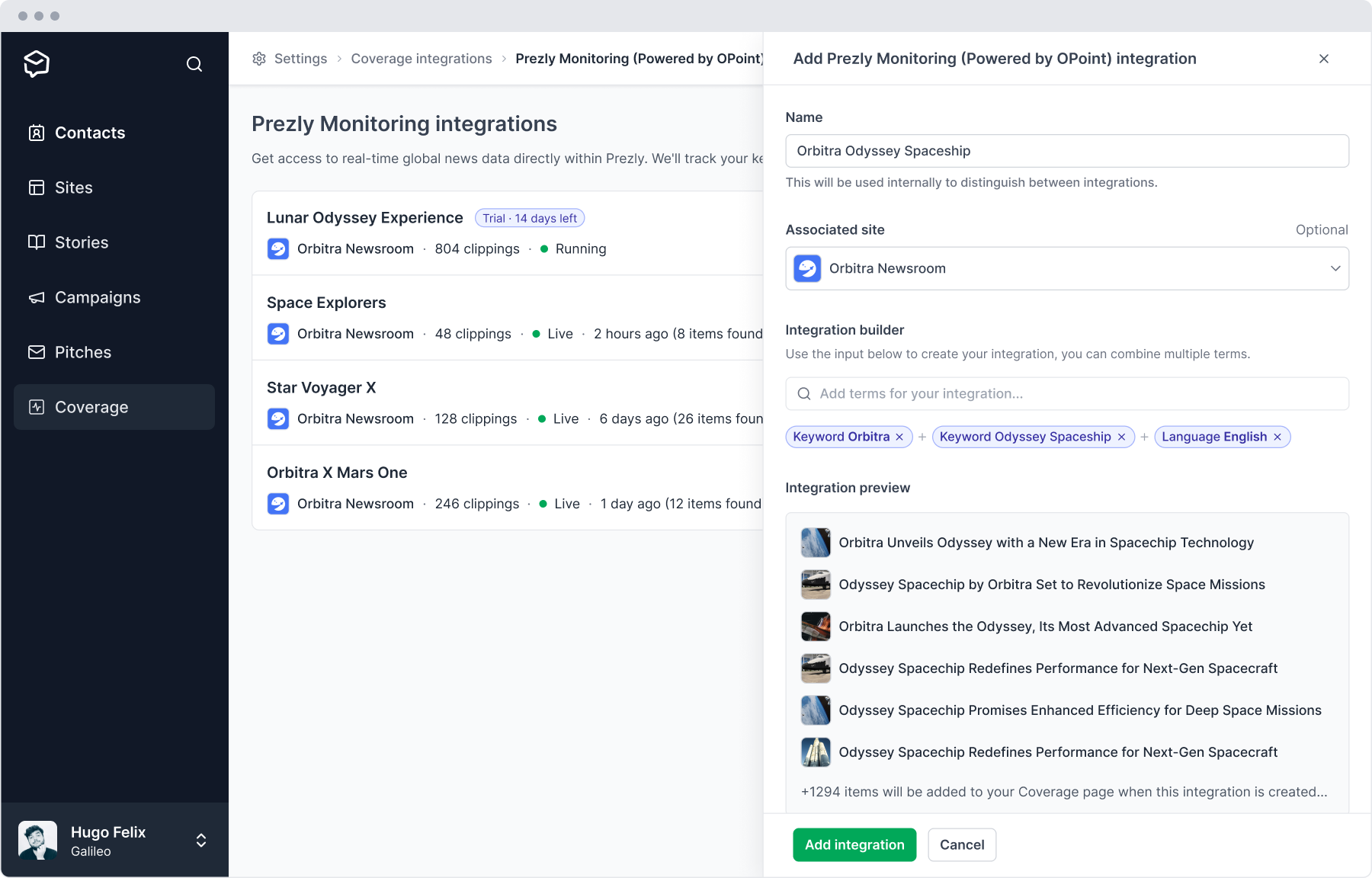
Prezly combines media monitoring, a PR CRM, email campaigns and public or private newsrooms. Teams can prepare contact segments and draft materials before an incident, publish official updates, send targeted media outreach and connect coverage with contacts and stories.
Good fit when:
- media and stakeholder communication is the main responsibility
- a crisis newsroom or dark site must be ready in advance
- the team needs shared media lists and relationship history
- official updates, assets and contact details need one stable home
- coverage and outreach should remain connected after the incident
Look elsewhere when:
- employee safety requires SMS, voice, location targeting or acknowledgements
- you need on-call routing or operational incident playbooks
- global threat intelligence or deep social listening is required
- life-safety systems need specialized redundancy and compliance
Published plans start at €100 per month billed annually. Check Prezly's pricing for current limits.
Explore Prezly's online newsroom, PR CRM and media monitoring.
Best for: large organizations that need targeted, multi-channel emergency alerts and coordinated incident communication.
Everbridge supports notifications through SMS, email, voice, mobile apps, desktop alerts, Microsoft Teams, Slack, social channels and digital signage. It offers list and location-based targeting, two-way communication, templates, role-based access and audit-ready reporting.
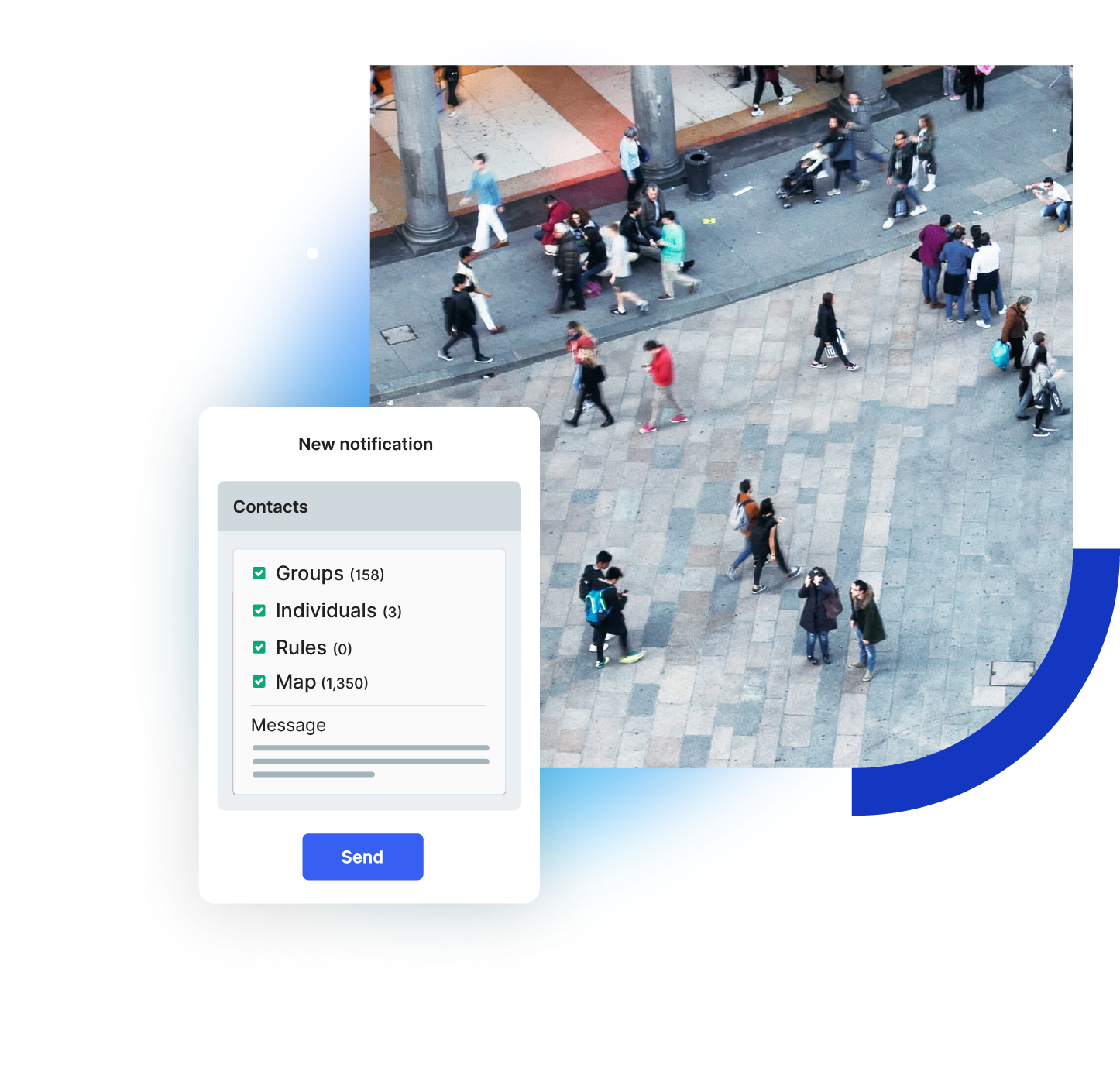
Everbridge’s illustrated notification composer separates group, individual, rule and map targeting before the sender writes an alert. It shows the targeting options, not a verified current production screen or actual recipient counts. Image: Everbridge. Source: Everbridge Mass Notification product page
Good fit when:
- employees or communities span many locations
- delivery and acknowledgement tracking matter
- alerts need multiple channels and geo-targeting
- HR, business-continuity and other systems must integrate
Look elsewhere when:
- the job is primarily media relations
- the organization needs a simple newsroom
- a small team cannot maintain a complex critical-event platform
Pricing is quote-based.
Visit Everbridge Mass Notification.
Best for: organizations that want threat intelligence, targeted mass notification and two-way employee communication in one platform.
AlertMedia combines emergency communication with threat intelligence and incident-response workflows. Its current mass-notification product includes templates, permissions, dynamic groups, geofencing, delivery analytics, acknowledgements and live event pages.
Good fit when:
- employee safety and operational communication are central
- recipient groups need to sync with workforce data
- teams must see who acknowledged an alert
- location-based targeting and multilingual messages matter
Look elsewhere when:
- media monitoring and journalist outreach are the main needs
- the team only requires a public status page
- published self-service pricing is essential
Pricing is quote-based.
Visit AlertMedia Mass Notification.
Best for: organizations that need emergency notification connected to wider risk intelligence and crisis support.
OnSolve is now part of Crisis24. Its capabilities include multi-channel alerts, incident tracking and reporting, while the wider Crisis24 portfolio adds intelligence, travel risk, medical and security support.
Good fit when:
- global risk and workforce safety belong in one programme
- alerts must be targeted by incident and location
- travel, security and medical support are important
- teams want technology backed by specialist services
Look elsewhere when:
- you only need media and social monitoring
- the crisis remit is limited to PR workflow
- a lightweight self-service tool is preferable
Pricing is quote-based.
Visit Crisis24 OnSolve.
Best for: enterprise security teams that need rapid event, threat and risk intelligence.
Dataminr analyzes public data sources across text, images, video, audio and sensors to surface emerging events. It can deliver alerts through web, mobile, email, APIs and enterprise integrations.
Good fit when:
- early physical, geopolitical or cyber signals matter
- assets and people operate across many locations
- corporate security has a dedicated response function
- alerts need to feed existing incident systems
Look elsewhere when:
- you need employee mass notification rather than intelligence
- the problem is journalist outreach or a public newsroom
- the organization lacks people to assess and act on frequent signals
Pricing is quote-based.
Visit Dataminr for Corporate Security.
Best for: communications teams that need broad media monitoring, social listening and journalist outreach.
CisionOne combines live monitoring across online, print, broadcast, podcast and social sources with alerts, analysis, reporting, journalist data and outreach.
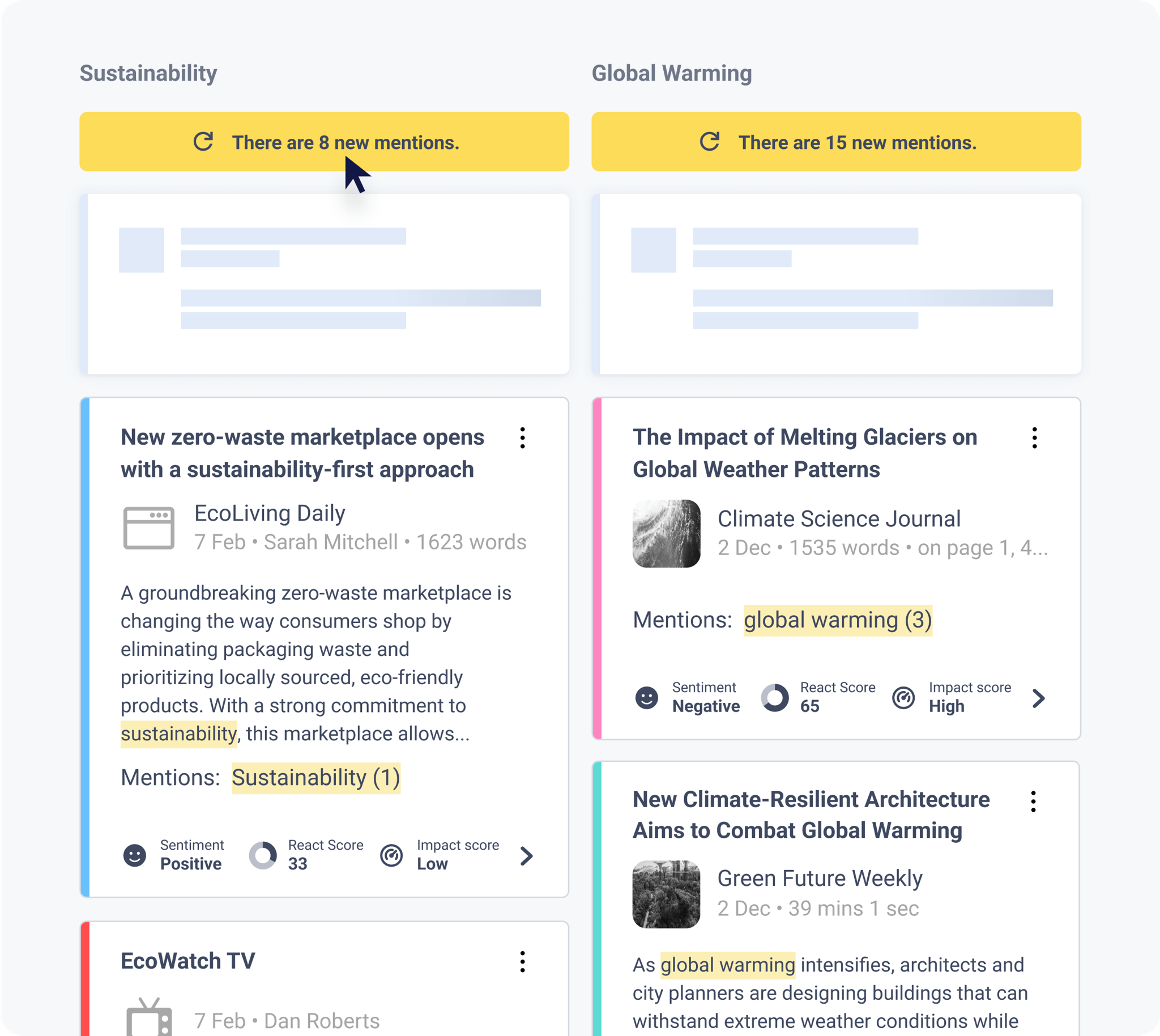
CisionOne sample Mention Streams compare topic mentions and display sentiment and impact beside each item. Image: Cision. Source: CisionOne product page
Good fit when:
- media narratives and journalist activity are the main risk signals
- global traditional and digital coverage matters
- monitoring, reporting and outreach should share one platform
- a large communications team needs common dashboards
Look elsewhere when:
- employee emergency notifications are required
- operational incident ownership and tasking are central
- the team needs transparent self-service pricing
Pricing is quote-based.
Visit CisionOne.
Best for: global PR teams that need real-time media and social alerts, narrative analysis and executive reporting.
Meltwater combines media intelligence and social listening with spike detection, sentiment analysis, dashboards and alerts delivered through email, mobile, Slack and Microsoft Teams.
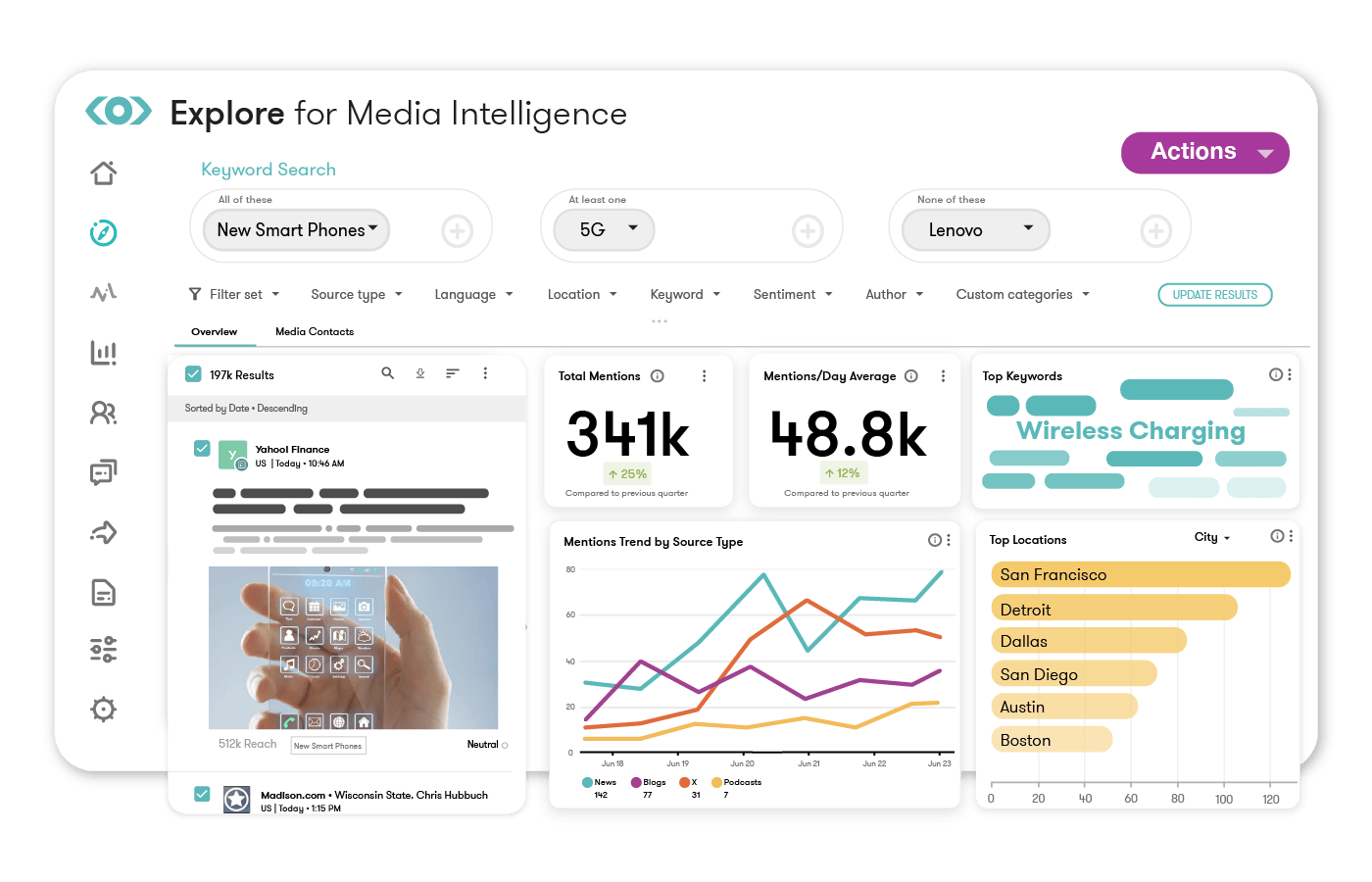
Meltwater sample Explore dashboard shows monitoring search, filters and mention trends. Figures are illustrative. Image: Meltwater. Source: Meltwater product page
Good fit when:
- reputation risks can emerge across news and social channels
- international source and language coverage matter
- teams need alerts for volume or sentiment changes
- leadership expects recurring media-intelligence reports
Look elsewhere when:
- life-safety notification is required
- an operational incident system is the main need
- a narrow, fixed-price monitoring tool would cover the job
Pricing is quote-based.
Visit Meltwater real-time alerting.
Best for: enterprise social listening, consumer intelligence and reputation analysis.
Brandwatch helps teams examine online conversations, audiences, topics, sentiment and trends. It is useful when a crisis is growing through social platforms or when public response needs deeper analysis than a mention alert.
Good fit when:
- social reputation is a significant risk
- consumer and audience research matter
- teams need historical context around a narrative
- PR, social and insights functions share the platform
Look elsewhere when:
- the need is mass notification
- traditional media and newsroom publishing are the main jobs
- a small team needs simple alerts
Pricing is quote-based.
Visit Brandwatch Consumer Intelligence.
Best for: technology and operations teams coordinating service incidents.
Jira Service Management aggregates alerts, routes issues, supports on-call communication, brings responders together, attaches runbooks and records incident timelines. It also connects with Statuspage for customer updates and creates post-incident reviews and follow-up work.
Good fit when:
- outages and technical incidents are major crisis scenarios
- DevOps and IT operations own resolution
- responders need alert routing, playbooks and a timeline
- follow-up problems and tasks must remain visible
Look elsewhere when:
- a reputational crisis has no operational incident component
- journalist contacts and media outreach are required
- employee mass notification is the main job
Atlassian publishes free and paid Jira Service Management plans. Check the current feature and user limits for incident and on-call capabilities.
Visit Jira Service Management incident management.
Best for: organizations that need a public or private source of truth during service incidents.
Statuspage lets teams publish incident states from investigating through resolved, show affected components and notify subscribers through email, SMS, webhooks and integrations depending on the plan.
Good fit when:
- service availability is the main public concern
- users need proactive incident updates
- support-ticket volume rises during outages
- incident tools should trigger status communication
Look elsewhere when:
- the crisis is unrelated to service status
- media assets, journalist contacts or full statements are required
- employees need location-based emergency alerts
Statuspage has a free public-page plan. Paid public plans currently start at $29 per month, with private and audience-specific products priced separately.
Visit Atlassian Statuspage.
Best for: giving a cross-functional crisis team one searchable coordination space.
A dedicated private channel can gather verified facts, drafts, owners, files and decisions. Slack Connect can also bring an agency or outside adviser into a controlled shared channel.
Good fit when:
- the organization already uses Slack
- crisis roles and channel conventions are documented
- integrations route alerts into the response workspace
- the team needs a searchable record of discussion
Look elsewhere when:
- urgent messages must reach employees who aren't active in Slack
- acknowledgements and escalation must be tracked
- the organization needs a formal incident timeline without additional discipline or tools
Slack publishes free and paid plans.
Visit Slack Channels.
Best for: Microsoft 365 organizations coordinating response through chat, meetings, files and integrated workflows.
Teams combines private channels, meetings, shared files, access controls and application integrations. It can serve as the crisis-team workspace while alerts arrive from monitoring, intelligence or notification systems.
Good fit when:
- the organization already runs Microsoft 365
- files, meetings and response discussion need one governed workspace
- security and information-protection controls matter
- crisis partners can be added under established guest policies
Look elsewhere when:
- the team needs public publishing or journalist outreach
- employee safety requires multi-channel notification and acknowledgements
- threat detection is not supplied by another system
Teams pricing depends on the Microsoft 365 or Teams plan.
Visit Microsoft Teams.
A familiar tool can still be useful during a crisis. Familiarity reduces training time, and nobody wants to learn an interface while the legal team is asking who approved the statement.
But ordinary email, chat and project software usually lacks some combination of:
- on-call routing and escalation
- multi-channel emergency delivery
- acknowledgement tracking
- geo-targeting
- dynamic workforce groups
- live threat intelligence
- a structured incident timeline
- public status communication
- audit-ready controls
Use Slack, Teams, shared documents and task systems where they fit. Don't relabel them as a complete crisis platform because they were already in the budget.
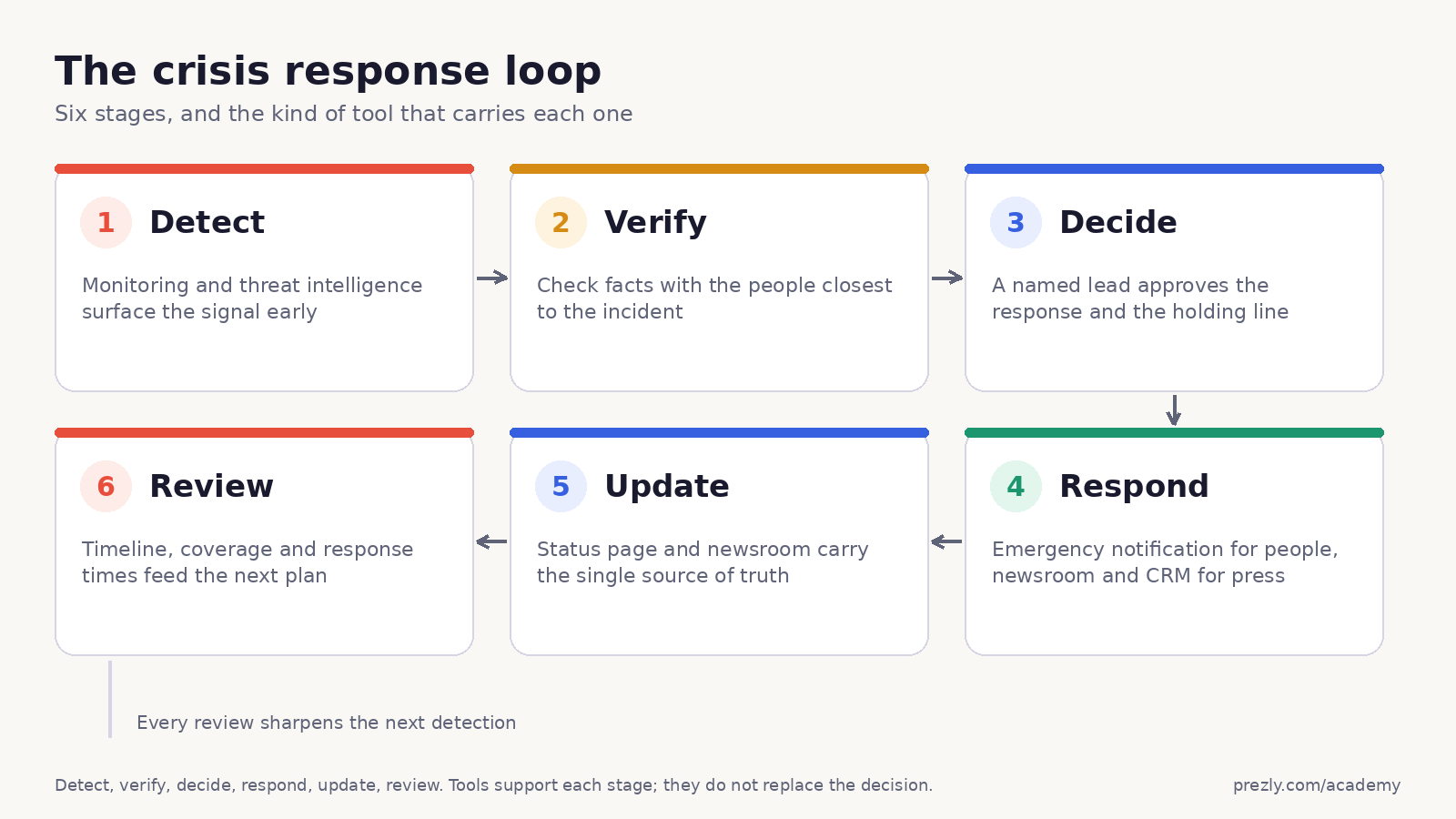
Monitoring, listening, security and operational systems surface an unusual event.
Prepare:
- monitored names, risks, locations and misspellings
- meaningful thresholds and escalation triggers
- after-hours alert routes
- backup detection sources
Confirm what happened before the organization amplifies a rumor or acts on the wrong incident.
Prepare:
- a named verification owner
- trusted internal and external sources
- a severity framework
- a place to record confirmed facts, unknowns and timestamps
Activate the right team, assign authority and choose the first action.
Prepare:
- role-based activation lists
- deputies for unavailable decision-makers
- legal, security, operations and communications paths
- approval deadlines and escalation rules
Take operational action and send the first useful message.
FEMA's current crisis-communication guidance emphasizes planning ahead, communicating promptly, acknowledging uncertainty, showing empathy and adapting messages as facts change.
Prepare:
- channel-specific holding statements
- emergency-notification templates
- spokesperson and media protocols
- translations and accessible formats
- contact groups matched to scenarios
Publish what changed, what people should do and when they will hear from you again.
Prepare:
- one authoritative newsroom or status page
- a visible update timestamp
- subscriber and outreach channels
- a correction process for outdated information
- monitoring for questions and misinformation
Reconstruct the timeline, evaluate the response and fix the process.
Prepare:
- delivery and acknowledgement records
- decision and approval history
- media and stakeholder response data
- action owners and deadlines
- a date for the next drill
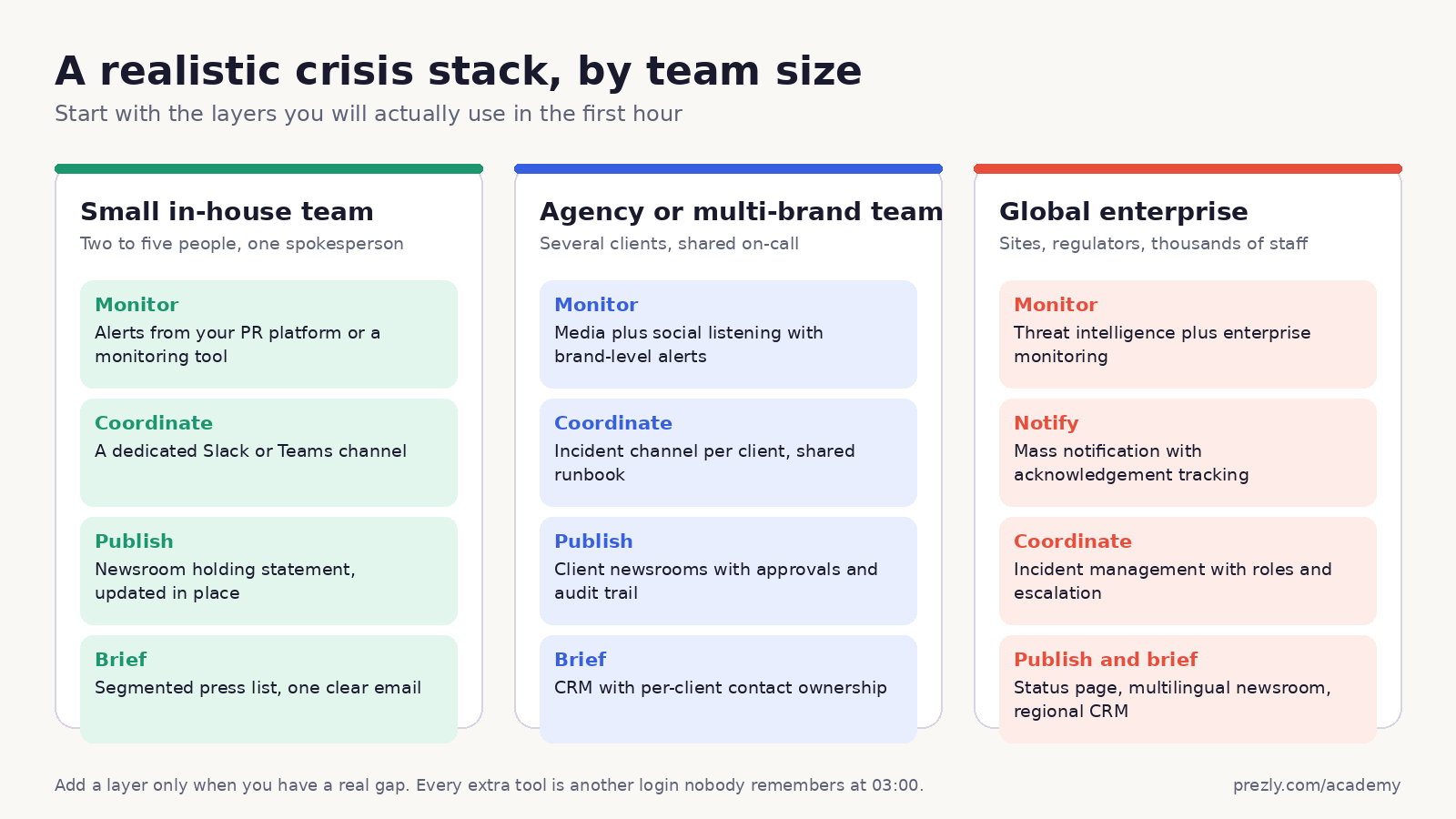
Start with:
- Prezly for media contacts, outreach, newsroom updates and PR monitoring
- Slack or Teams for private coordination
- native web and social analytics
- an emergency-notification service supplied by HR, security or operations when employee safety is in scope
The important bit is agreeing who owns each tool before an incident.
A practical stack may include:
- CisionOne or Meltwater for monitoring
- Prezly for client contacts, newsrooms and targeted outreach
- Slack or Teams for agency-client coordination
- a shared approval and decision log
- the client's own emergency, legal and operational systems
The agency can support communication. It should not quietly become the client's incident commander because everyone else left the video call.
Combine:
- Jira Service Management for operational response
- Statuspage for customer updates
- Slack or Teams for coordination
- Prezly for wider media and stakeholder communication
- monitoring for reputation and coverage response
This separates fixing the outage from explaining it without allowing either job to disappear.
Consider:
- Dataminr, Crisis24 or another intelligence provider for risk detection
- Everbridge or AlertMedia for employee and emergency communication
- Jira Service Management or an enterprise incident platform for response workflows
- CisionOne, Meltwater or Brandwatch for media and social intelligence
- Prezly for journalist relationships and an official newsroom
- governed collaboration and business-intelligence systems
The difficult part is integration and ownership, not acquiring one more dashboard.
Run vendors through situations your organization could face:
- cyberattack or service outage
- severe weather near a workplace
- executive misconduct allegation
- product safety problem or recall
- misinformation spike
- protest or physical-security event
Ask the team to execute the workflow, not watch a polished demo.
Test whether the system finds known signals and filters irrelevant noise. Review languages, sources, locations, latency and after-hours delivery.
Confirm who can be reached through SMS, voice, email, apps, chat, desktop alerts or other channels. Check accessibility and multilingual support.
Can recipients confirm safety, request help or answer a question? What happens when the first person does not respond?
Check who can activate an incident, send to which groups, approve a public update, edit templates and see sensitive information.
Verify HR, identity, monitoring, on-call, CRM, collaboration, status-page and analytics connections. Confirm how often contacts and locations update.
Ask about uptime, redundancy, data regions, authentication, single sign-on, audit logs, disaster recovery and vendor support during a live event.
Make sure you can reconstruct what was detected, decided, sent, delivered, acknowledged, published and changed.
Include users, contacts, locations, channels, message volume, data feeds, integrations, onboarding, training, support and contract minimums.
A cheap system nobody drills is expensive. An expensive system nobody understands is modern sculpture.
Before signing, confirm:
- Which crisis scenarios does the tool support?
- Which stage of the response workflow does it own?
- Who receives alerts after hours?
- Can contacts and locations sync automatically?
- Does it support two-way communication and acknowledgements?
- Can messages be translated and made accessible?
- Are templates, permissions and approval paths configurable?
- Can the team work from mobile devices?
- What happens if one channel fails?
- Does it integrate with existing systems?
- Can sensitive incidents remain private?
- Is every action recorded in an exportable timeline?
- What are the uptime, support and recovery commitments?
- Can data be exported after cancellation?
- How often will the organization run a drill?
At minimum, document:
- likely scenarios and severity levels
- the crisis team and deputies
- who can declare an incident
- who owns operational and communication decisions
- employee, media, customer, partner and regulator groups
- holding statements and update templates
- newsroom, status-page and social access
- spokesperson and approval rules
- after-hours contact methods
- a correction and misinformation process
- drill dates and review owners
Read our guide to crisis communication planning and the lessons from real PR crisis examples.
Crisis management software helps organizations detect incidents, coordinate decisions, notify affected people, publish updates and record the response. Different products specialize in different stages.
Most organizations need detection, internal coordination, urgent notification and an authoritative update channel. The exact products depend on whether the main risks involve reputation, technology, physical safety, operations or several of them.
Crisis communication software helps send accurate, timely updates to employees, customers, journalists or other stakeholders. It may include mass notification, contact segmentation, templates, newsrooms, status pages, delivery tracking and acknowledgements.
They can coordinate the response team, but they do not replace threat detection, employee mass notification, public updates or formal incident management. Use them as one layer of the system.
Media monitoring detects coverage and public conversation. Crisis management includes verification, authority, operational action, stakeholder communication, updates and review. Monitoring is an input, not the whole response.
It needs a crisis process and dependable communication channels. A small team may use existing collaboration tools, a newsroom, contact lists and simple monitoring. Specialized mass notification becomes more important when employee safety, multiple locations or regulated responsibilities are involved.
Test contact data and critical workflows regularly, and run scenario-based drills on a documented schedule. Test after major staffing, system or location changes as well. The exact frequency depends on risk and regulation.
Track detection time, verification time, activation time, message-approval time, delivery, acknowledgements, channel failures, decision gaps and follow-up actions. The purpose is to improve the system, not produce a reassuring slide.
Choose crisis management tools by the stage of the response they own.
Use monitoring and intelligence to detect. Use incident systems and collaboration tools to coordinate. Use emergency notification to reach affected people. Use a newsroom or status page for authoritative updates. Use stakeholder contacts and outreach to reach defined audiences. Then preserve the timeline and learn from it.
Prezly is a strong communication layer for PR teams: monitoring, contacts, targeted outreach and official newsroom updates in one workflow. It is not an emergency-notification or enterprise incident-management platform, and it should sit beside those systems when the risk demands them.
The software matters. The rehearsed decisions between the tools matter more.

Build better PR, with Prezly
- Create and publish: Build beautiful press releases.
- Build relationships: Keep your contacts organized.
- Reach your audience: Send targeted pitches.