Follow up on your pitches and campaigns
Send a reply to a previous pitch or campaign without rebuilding the conversation from scratch.
You can now send follow-ups as replies to your previous pitches and campaigns. Give your contacts a reminder or share an update without making them search their inbox for the context.
- Follow up on a sent pitch, or select recipients in a campaign report to send a follow-up campaign. You can also send a personal follow-up to an individual campaign recipient.
- Write your new message with the original subject and email history already in place. Expand the original message in the editor whenever you need a reminder of what you sent.
- Send when you're ready, or schedule your follow-up for later.
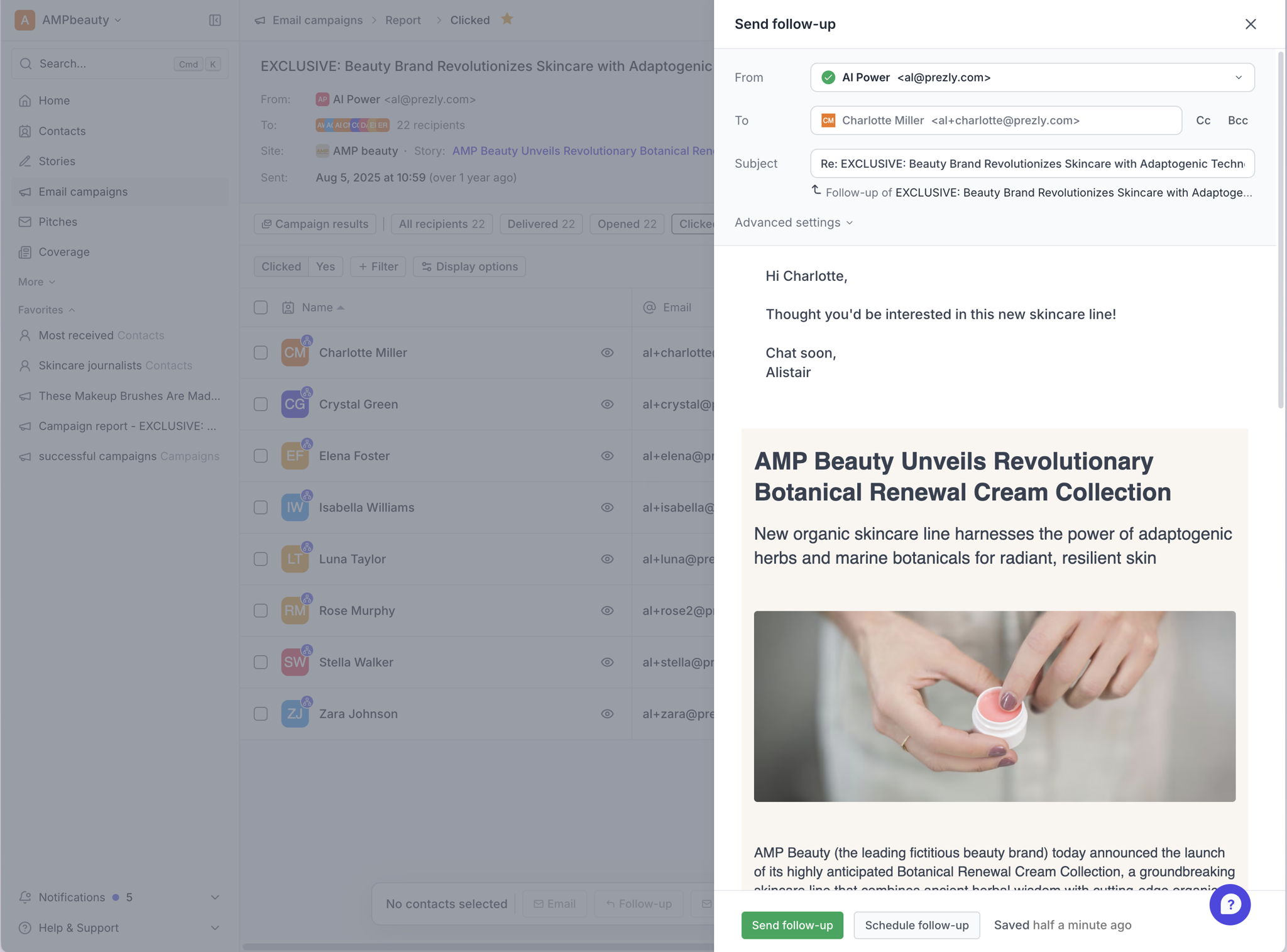
The recipient of the email will get a threaded email campaign similar to sending a follow-up message from outlook or gmail.
The feature throughout the app. A quick overview of where you'll find 'follow-up' buttons:
- Sent Email Campaigns
- on the top of the page
- mass actions (select + follow-up)
- a button on each recipient
- Pitches grid
- Email details (sidebar)
- Contact activity stream
We've also made related emails easier to follow throughout Prezly. Pitch lists, email previews, campaign reports, and contact activity now show how follow-ups connect to the original message, so you and your teammates can see what's already been sent before reaching out again.
Tried it? Let us know what you think - get in touch with our support team - we’d love to hear from you.