Bring your brand’s fonts to your newsroom
Customise your newsroom typography with more font choices and your own uploads
You can now go beyond Prezly’s preset font combinations. Choose from a wider selection or upload your own fonts, using the same style throughout your site or different fonts for headings and body text.
Use the same font throughout your site, or choose different fonts for headings and body text to match your brand’s style.
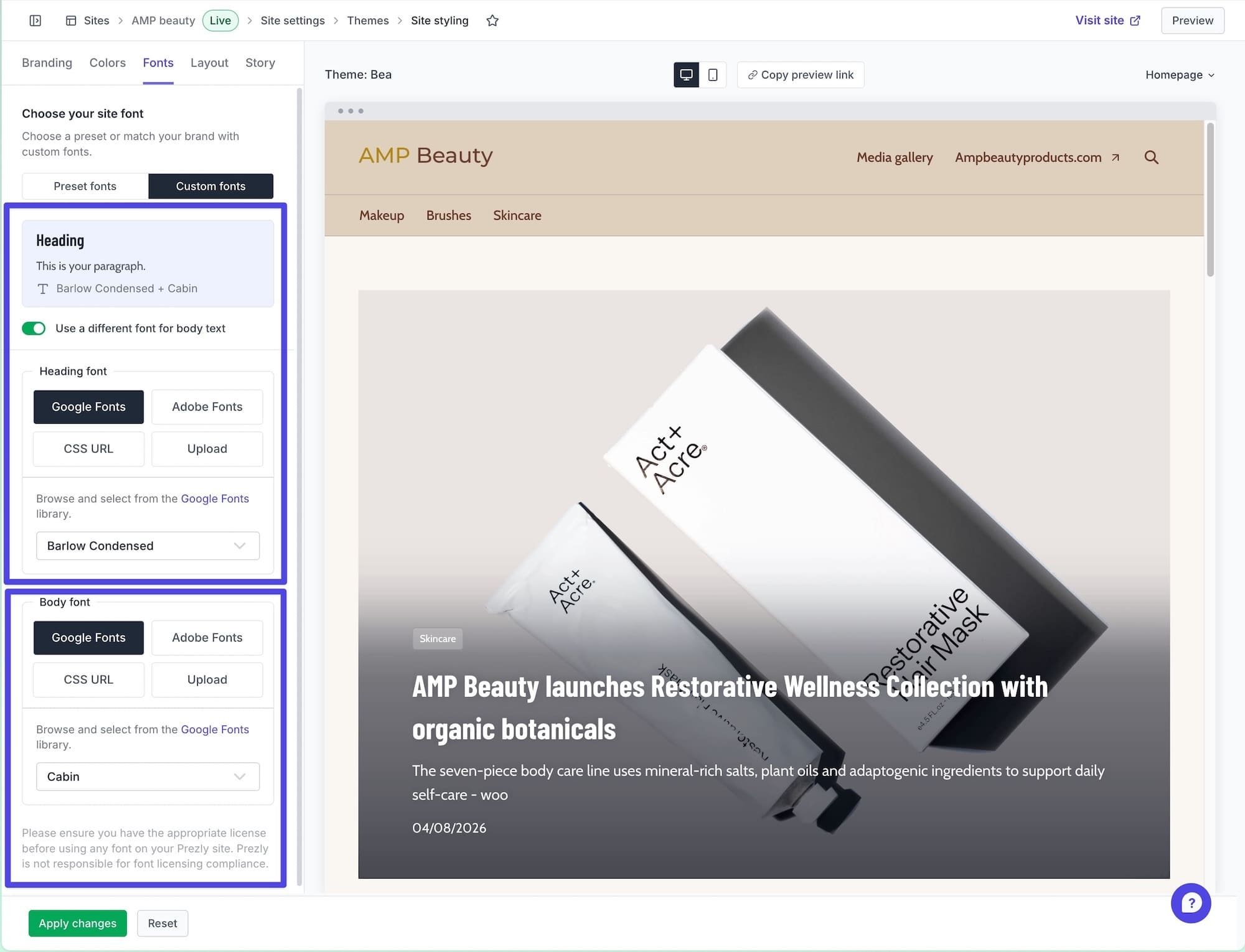
- Google Fonts: Browse the library and pick a font.
- Adobe Fonts: Connect fonts from your Adobe Fonts project.
- CSS URL: Add a link to your font stylesheet.
- Upload: Upload your own font files directly.
- Open your site and go to Site settings → Edit styling.
- In the Fonts tab, select Custom fonts.
- Choose a source and add your font. Turn on Use a different font for body text if you want a separate font for paragraphs.
- Check your font combination, then click Apply changes.
For more on making your site your own, see our site styling guide.
Custom fonts, including uploads, are available on Standard and above for brand plans, and all current agency plans, including Agency Essential, for sites using the Bea theme.
If you’re on a essential or legacy plan and want access, get in touch with our team to find the right plan for you.
Software for people
who care about PR.
Manage your stories, media contacts, and pitches in one place.
Try Prezly yourself or let us show you around.
14-day free trial. No credit card required.