Build Audience is now out of beta
Choose how you add recipients to campaigns.
Earlier this month, we introduced Build Audience in beta, giving a small group of users a new way to choose recipients when creating an email campaign.
Since then, we’ve been testing it in real campaign workflows, improving the interface and making a number of performance improvements. Now it’s ready for wider release.
Build audience gives you a quicker way to choose campaign recipients based on tags, saved views, previous campaigns, or simply a list of email addresses, while automatically taking care of any duplicates.
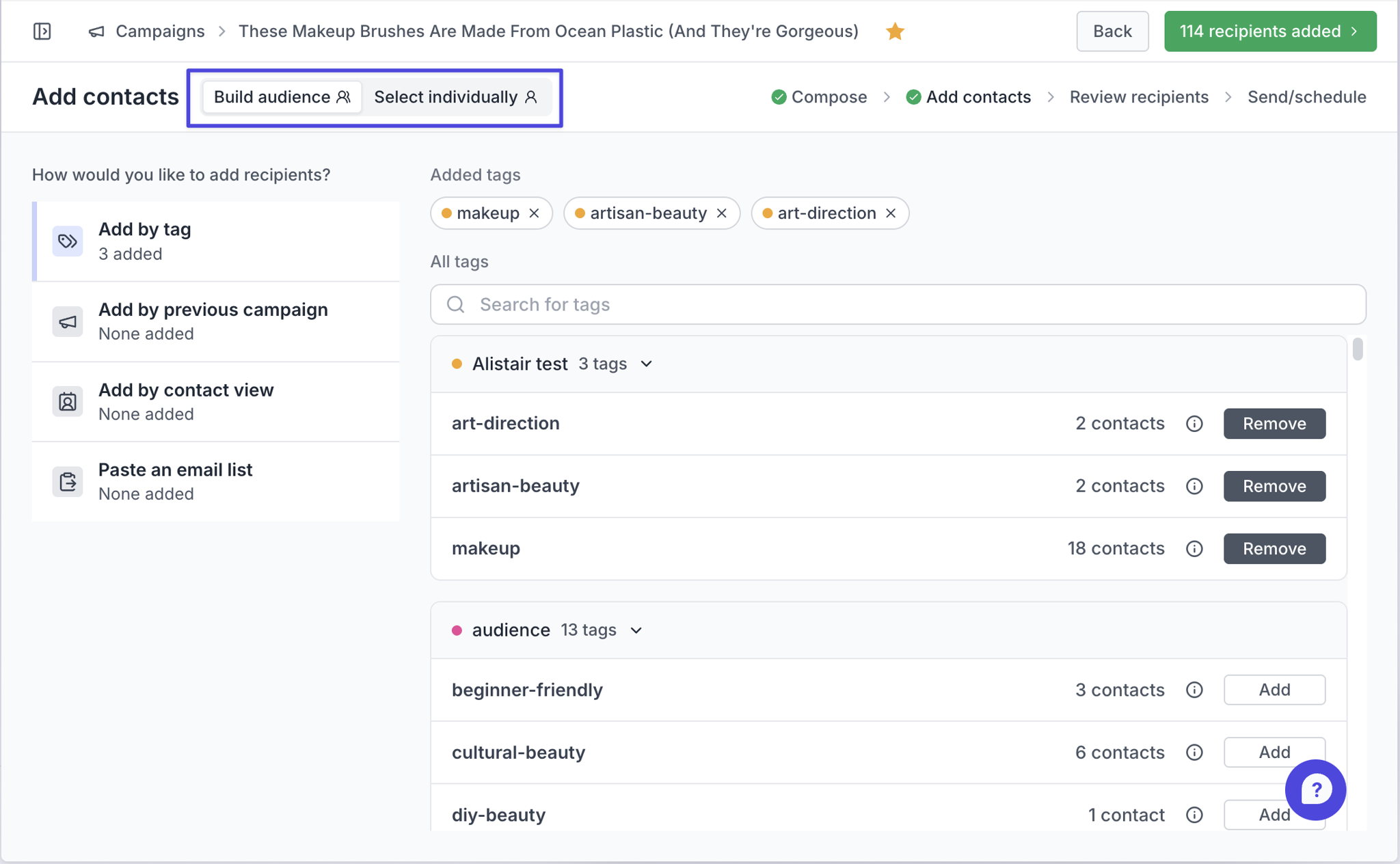
- Choose Build audience in Step 2: Add contacts of the campaign builder. (You can revert to the old method of adding contacts by clicking Add individually)
- You can add recipients to your campaign by…
- Selecting one or more tags
- Starting with the recipients of an earlier campaign
- Adding contacts from a saved contact view
- Pasting in a list of email addresses (these are checked automatically; if Prezly finds a valid address that isn’t already among your contacts, you can choose to create a new contact for it or leave it out)
- Review your recipients in the next step as usual
People on all our current plans. If you're on a legacy plan and want access to this and other new features, get in touch and we'll help you move to a current plan.
Join 500+ PR teams already loving Prezly
Take the stress out of contact management and distribution with a dedicated outreach CRM that your whole team can use.