
Open & click tracking
Click reports are only available for Standard/Agency and Enterprise plans. If you wish to activate this, please go to your Plans page in your Subscription & Billing settings.

Prezly allows you to choose whether or not to track the Open and Click interactions of your recipients before you send your campaigns and pitches.
Some users may want this turned off to improve deliverability, protect subscriber privacy, or simplify link management for specific technical reasons.
Where do I find these options?
- From the Campaign Composer, this is located in Step 4 > Send or Schedule Your Campaign.

- From the Pitch Composer, this is located under the Advanced settings menu.
After a campaign or pitch has been sent, it will no longer be possible to turn off and reverse these settings.
Once you've sent your comms, the open and click rates will then be reported in the following areas:
- Your Campaign Report
- Your Pitch Dashboard
- Recipients' Contact Preview box
Opened
You can see how many times a specific contact has opened your emails (this includes all emails that have been sent to them) by clicking on "Opened" and looking at stats under the Opens column.
We track open rates by inserting a small invisible image into your email campaign. This doesn't affect how your email will look – it's a common practice used to count email opens, as it counts how many times the image was loaded.
It is important to note that some email servers or email providers block the automatic loading of images, so it is possible that some contacts that actually opened the email become marked as Unopened.
Clicked
The Click report shows you more in-depth reporting on which links in your sent campaign had the most to least clicks, and to see which of your recipients clicked on specific links, simply click on a Click count number.
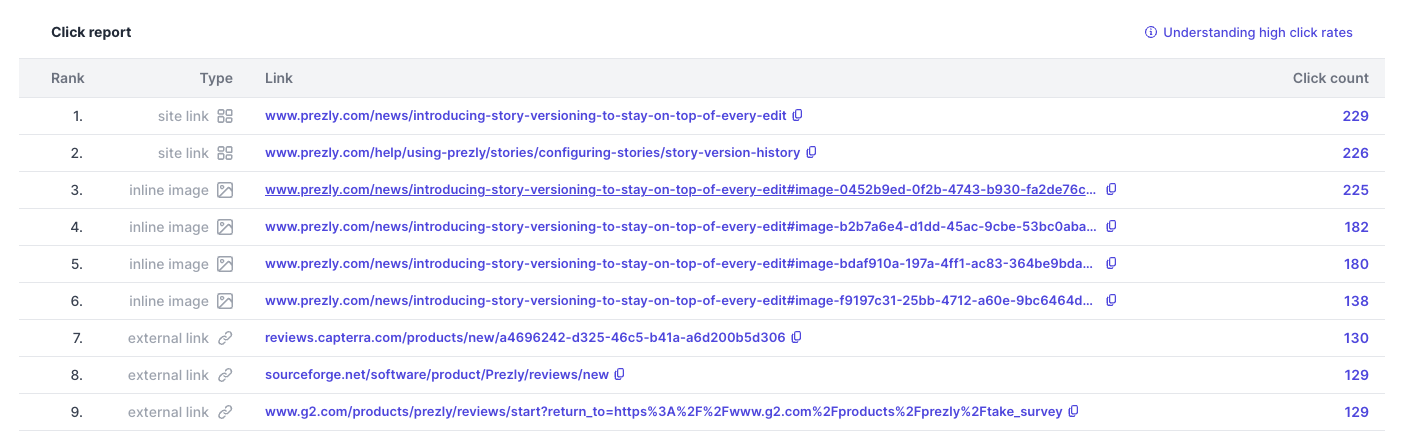
Contacts seen in the Clicked list have clicked on at least one single link in the published story attached to the email. You can see which one specifically in the "Type" column:
- Inline image
- Gallery image
- Video
- Contact
- Bookmark
- Attachment (also applicable to all media/attachments added directly in the campaign editor)
- Site link → Any link to a Prezly site that is not an asset link (including other sites in the license)
- External link → Any link that doesn't belong to a Prezly site (including other sites in the license)